Archive for the ‘C / C++’ Category

Priority queues – Part 1

Monday, June 21st, 2010

This is all about priority queue problems with using different techniques for storing the data in a queue, the priority queue could be similar to a queue in a hospital ER ward where the people with the biggest of problems are treated first.

So the CS106B course does two versions which use a vector and a single linked list to do and then we have to implement a chunk list and and a heap implementation, here I am going to do a chunk list and the next post will be the heap version.

So to explain what a chunk list is instead of a having just a single value within a linked list we will have a chunk of values within a block of memory and then once that chunk is filled to then create a new chunk and link to that one. So it is very similar to a linked list, but the main parts of how to store data within the chunk array (without using a vector but a array of data that we have to manage) and how to split the chunks once they reach there maximum storage capacity. It is explained in the PDF assignment attached in the zip file.

Anyway, here is the interface/header file of the priority queue that we have to implement so that if the program will use any of the different versions to store data linked list, chunk, heap, vector.

class PQueue {
  public:
    PQueue();
    ~PQueue();
    int size();
    bool isEmpty();
    void add(int elem);
    int extractMin();
private:
 // implementation dependent member variables and helper methods
};

To start with, I need to find out where the chunk to insert the value into, this would accomplished by searching the present chunks and if the inserting value is lower than highest value in that chunk then this is the chunk to insert into since they are already in sorted order then the searching process will always find the correct place to insert into. So here is how I find that highest chunk to insert into, it uses recursive technique to find the chunk

// find the highest chunk of space where newElem could be placed into the best chunk
PQueue::chunkSpace* PQueue::findHighestChunk(chunkSpace *&space, int newElem)
{
	if (space == NULL) return NULL;
	// found the previous chunk to insert into
	if (space->values[space->lastBlock-1] > newElem && space->lastBlock > 0)
			return space;
	else
	{
		chunkSpace *retPlace = findHighestChunk(space->nextBlock, newElem);
		if (retPlace == NULL)
			return space;
		else
			return retPlace;
	}
}

could have used a for loop to search thought like

for (chunkSpace *head = chunks, *pre = chunks; head != NULL; head = head->nextBlock)
{
   if (head->values[head->lastBlock-1] > newElem)
       break;
   pre = head;
}

but then you would need to check for NULLs etc so just thought that I would use recursive since it is just a nice thing :) . once found the highest chunk to insert into then we can insert a value if there is space, if not then split the chunk into two and then insert the new value into the correct chunk

	if (space->lastBlock == MaxElemsPerBlock)
	{
		// split into two, divide the blocks in half and rebuild the structures
		int insertI=0;
		int div = MaxElemsPerBlock/2;
		chunkSpace *newSpace = new chunkSpace();
		// rebuild links
		newSpace->nextBlock = space->nextBlock;
		newSpace->values = new int[MaxElemsPerBlock];
		space->nextBlock = newSpace;
 
		// copy over values
		space->lastBlock -=div;
		for (int i =div; i < MaxElemsPerBlock; i++)
			newSpace->values[insertI++] = space->values[i];
		newSpace->lastBlock = div;
		// find out where to insert, new space or previous space
		if (newSpace->values[0] < newElem)
			space = newSpace;
	}

which the code above will split the present chunk into 2 and then rebuild the links and place the data from the first one (half way forwards) into the second chunk, of course we need to insert the new value into the correct chunk which is why there is a test at the end to see if the new value is greater than the second chunks first value.

Here the full source of the pqchunk.cpp which does all of the pqueue for chunks and also some have included below the bits that I added into the pqueue.h file.

#include "pqueue.h"
#include "genlib.h"
#include <iostream>
 
/* 
  chunk memory implementation
*/
 
// constant max allocation of the 
const int MaxElemsPerBlock = 4;
 
PQueue::PQueue()
{
	// setup the first instance of chunks
	chunks = new chunkSpace();
	chunks->nextBlock = NULL;
	chunks->lastBlock = 0;
	chunks->values = new int[MaxElemsPerBlock];
	theSize = 0;
}
 
PQueue::~PQueue()
{
	// deallocate the memory of the chunks
	deleteChunks(chunks);
}
 
// delete the chunks and recursive call itself to loop down the list
void PQueue::deleteChunks(chunkSpace *space)
{
	if (space == NULL) 
		return;
	else
	{
		deleteChunks(space->nextBlock);
		deleteBlock(space);
	}
}
 
void PQueue::deleteBlock(chunkSpace *space)
{
	delete[] space->values;
	delete space;
}
 
bool PQueue::isEmpty()
{
	if (theSize == 0)
		return true;
	else 
		return false;
}
 
int PQueue::size()
{
	return theSize;
}
 
void PQueue::add(int newElem)
{
	chunkSpace *space = findHighestChunk(chunks, newElem);
	// split the block if at the maxiumum of elements allowed once the insertation has taken place.
	if (space->lastBlock == MaxElemsPerBlock)
	{
		// split into two, divide the blocks in half and rebuild the structures
		int insertI=0;
		int div = MaxElemsPerBlock/2;
		chunkSpace *newSpace = new chunkSpace();
		// rebuild links
		newSpace->nextBlock = space->nextBlock;
		newSpace->values = new int[MaxElemsPerBlock];
		space->nextBlock = newSpace;
 
		// copy over values
		space->lastBlock -=div;
		for (int i =div; i < MaxElemsPerBlock; i++)
			newSpace->values[insertI++] = space->values[i];
		newSpace->lastBlock = div;
		// find out where to insert, new space or previous space
		if (newSpace->values[0] < newElem)
			space = newSpace;
	}
	insertIntoBlock(space, newElem, space->lastBlock);
	space->lastBlock++;
	theSize++;
}
 
void PQueue::insertIntoBlock(chunkSpace *space, int newElem, int blockIndex)
{
	// base case of nothing already
	if (blockIndex == 0)
	{
		space->values[0] = newElem;
		return;
	}
	if (space->values[blockIndex-1] <= newElem)
	{
		space->values[blockIndex] = newElem;
		return;
	}
	if (space->values[blockIndex-1] > newElem)
	{
		space->values[blockIndex] = space->values[blockIndex-1];
		return insertIntoBlock(space, newElem, (blockIndex-1));
	}
}
 
void PQueue::printOutBlocks(chunkSpace *block)
{
	if (block == NULL)
		return;
	else
	{
		cout << "print out block " << endl;
		for (int i =0; i < block->lastBlock; i++)
			cout << "i " << i << " value =" << block->values[i] << endl;
		printOutBlocks(block->nextBlock);
	}
}
 
// find the highest chunk of space where newElem could be placed into the best chunk
PQueue::chunkSpace* PQueue::findHighestChunk(chunkSpace *&space, int newElem)
{
	if (space == NULL) return NULL;
	// found the previous chunk to insert into
	if (space->values[space->lastBlock-1] > newElem && space->lastBlock > 0)
			return space;
	else
	{
		chunkSpace *retPlace = findHighestChunk(space->nextBlock, newElem);
		if (retPlace == NULL)
			return space;
		else
			return retPlace;
	}
}
 
int PQueue::extractMin()
{
	if (isEmpty())
		Error("no more values left");
	else
	{
		int returnValue = chunks->values[0];
		theSize--;
		for (int i =1; i < chunks->lastBlock; i++)
			chunks->values[i-1] = chunks->values[i];
		chunks->lastBlock--;
		if (chunks->lastBlock == 0)
		{
			// if chunks->nextBlock != NULL then remove this block and repoint the chunks to the nextBlock
			if (chunks->nextBlock != NULL)			
			{
				chunkSpace *old = chunks;
				chunks = chunks->nextBlock;
				deleteBlock(old);
			}
		}
		return returnValue;
	}
	return 0;
}

and here is the bits that I added to the private

   struct chunkSpace
   {
		int lastBlock;
		int *values;
		chunkSpace *nextBlock;
   };
 
   chunkSpace *chunks;
   int theSize;
 
   void deleteChunks(chunkSpace *space);
   void deleteBlock(chunkSpace *space);
   chunkSpace *findHighestChunk(chunkSpace *&space, int newElem);
   void printOutBlocks(chunkSpace *block);
   void insertIntoBlock(chunkSpace *space, int newElem, int blockIndex);

which hides my local variables as such and methods.

Linked list – recursive functions

Friday, June 11th, 2010

A linked list, is basically a list of elements that have a link attached to each one to the next. So for example if you have a structure like

struct List {
     string name;
     List *next;
};

then the List has a internals of a name which is of type string, and then a link (a pointer) to the next List in the list of linked List types. I have called it a Elem in the source code below because then it may make more sense, since it is kinder a element of the whole linked list.

So to create a I wrote a function to add a element (Elem) to the list already, since we are going to be altering the list then need to pass as a reference (&) so we actually alter the main variable and not just the functions variable and it is not passed back.

struct Elem {
	string name;
	Elem *next;
};
 
// inserts a Elem into a linked list
void setUpElem(Elem * & list, Elem *addnew)
{
	addnew->next = list;
	list = addnew;
}
 
.. 
int main()
{
    Elem *elem = NULL;
    Elem newElem;
    newElem.name = "bob";
 
    setUpElem(elem, &newElem);
}

with the function call setUpElem, I am passing the address of the newElem because that is the pointer (the address memory location).

So to start with the recursive functions, lets print out all of the elements,

// just print out the top element 
void printOutElem(Elem *elem)
{
	cout << "Name : " << elem->name << endl;
}
 
// recursive loop to print them all out
void printThemAllOut(Elem *list)
{
	if (list != NULL)
	{
		printOutElem(list);
		printThemAllOut(list->next);
	}
}

printOutElem will print out the element name associated with the parameter, and the cool recursive function called printThemAllOut, which just re-calls itself with the link to the next element to print out.. just a nice little function..

The next recursive that makes allot more sense, is when you are adding a element instead to the head of the list, but in the middle, like it is sorted, then if you was using loops you would require to keep hold of the previous element so that you can insert the new element into that previous elements -> next link and re-link the inserted element -> next to the current element in the list, hopefully the code helps to understand..

void insertIntoMiddle(Elem *&elem, Elem *midElem)
{
	Elem *cur, *pre= NULL;
 
	for (cur=elem; cur != NULL; cur= cur->next)
	{
		if (cur->name > midElem->name) break;
		// store where we was
		pre = cur;
	}
 
	// place the middle next element equal to where we are in the list
	midElem->next = cur;	
	// if the previous is not null, e.g. previous was somewhere in the list
	if (pre != NULL)
		pre->next = midElem;  // update the previous link to the middle element
	else
		elem = midElem;			// else probably is empty !!.. not good.. 
}

and here is a very nice recursive function that will do the same as above but just in recursive calls to itself with passing the previous link to itself so there is no need to keep a element of the previous link, very nice and allot more easier to debug since less code.

void insertIntoMiddleRecursive(Elem *&elem, Elem *midElem)
{
	if (elem == NULL || elem->name > midElem->name)
	{
		midElem->next = elem;
		elem = midElem;
	}
	else
		insertIntoMiddleRecursive(elem->next, midElem);
}

here is the full source code

#include <string>
#include <iostream>
 
using namespace std;
 
// the element structure, the name is the name of the person
// and the next is a link to next name
struct Elem {
	string name;
	Elem *next;
};
 
// inserts a Elem into a linked list
void setUpElem(Elem * & list, Elem *addnew)
{
	addnew->next = list;
	list = addnew;
}
 
// just print out the top element 
void printOutElem(Elem *elem)
{
	cout << "Name : " << elem->name << endl;
}
 
// recursive loop to print them all out
void printThemAllOut(Elem *list)
{
	if (list != NULL)
	{
		printOutElem(list);
		printThemAllOut(list->next);
	}
}
 
// you have to keep in contact with the current and previous 
// (since that is where we need to place the new element
void insertIntoMiddle(Elem *&elem, Elem *midElem)
{
	Elem *cur, *pre= NULL;
 
	for (cur=elem; cur != NULL; cur= cur->next)
	{
		if (cur->name > midElem->name) break;
		// store where we was
		pre = cur;
	}
 
	// place the middle next element equal to where we are in the list
	midElem->next = cur;	
	// if the previous is not null, e.g. previous was somewhere in the list
	if (pre != NULL)
		pre->next = midElem;  // update the previous link to the middle element
	else
		elem = midElem;			// else probably is empty !!.. not good.. 
}
 
// a far better way of doing this is to use recursive for inserting
// since the parameter is the previous link :)
// this is just a far nicer way of doing the above function
void insertIntoMiddleRecursive(Elem *&elem, Elem *midElem)
{
	if (elem == NULL || elem->name > midElem->name)
	{
		midElem->next = elem;
		elem = midElem;
	}
	else
		insertIntoMiddleRecursive(elem->next, midElem);
}
 
int main()
{
	Elem *elem = NULL;
 
	Elem newElem;
	newElem.name = "steve";
	setUpElem(elem, &newElem);
	Elem nextElem;
	nextElem.name = "genux";
	setUpElem(elem, &nextElem);
 
	printThemAllOut(elem);
 
	// now lets insert into the middle of the linked list
	Elem midElem;
	midElem.name = "henry";
	insertIntoMiddle(elem, &midElem);
 
	cout << "after the insert of \"henry\" into the middle" << endl;
	printThemAllOut(elem);
 
	Elem newMidElem;
	newMidElem.name = "janet";
	insertIntoMiddleRecursive(elem, &newMidElem);
 
	cout << "after the insert of \"janet\" into the middle - using recursive :) " << endl;
	printThemAllOut(elem);


    return 0;
}

and here is the output

Name : genux
Name : steve
after the insert of "henry" into the middle
Name : genux
Name : henry
Name : steve
after the insert of "janet" into the middle - using recursive :)
Name : genux
Name : henry
Name : janet
Name : steve

Boggle

Thursday, June 10th, 2010

This is all about recursive problems and this is the main problem!.. a boggle which is when you have a 4*4 grid of letters and you need to find letter within it.

The PDF within the zip file attached explains more in more detail, but the main basics of the game is that you setup a grid with random letters (in the assignment you could also take in user input to build up the grid from that, or there was a file of 16 dice with there set characters on them). And then once the grid is built up to then find words within that grid, you can use any letters from within that letter that you are at within a 3*3 grid around it (if possible e.g. no sides) but you cannot re-use any letters that you have already used.

In this assignment it was to use recursive functions to solve the problem of finding words, from the computer point of view, it should find all of the words within the grid, but the human point of view (whom goes first) tries to find all of the words within the grid and the recursive function should make sure that there is a possible combination of that word within the grid.

Both of the functions are very similar, here is the human version, in this version we only need to make sure that the word to find (findThis) is within the grid of characters, below this is a example of the grid. The parameters are what to find (findThis) the board to search (theBoard) the route taken to find this word (theRoute) and the later 3 are internal maintenance of recursive calling, alreadyFound is the word already found (could have used the theRoute, but though it would be nice to another string) and also the point of where we are, placeY placeX.

So to start with the base case is if we have found the string to find, findThis, if not, then if we have just started the search (alreadyFound is empty) then find the first letter within the grid, once found it then re-call the function to find the other letters using the place where we found the first letter (and next and next letters), so once we have found the first letter the already found string is not empty, so search around the letter (not itself) within a 3*3 grid. Most of the bits inside of the code is filling in the route path and also updating the already found string.

bool findUsersWord(string findThis, Grid<char> &theBoard, Vector<cell> &theRoute, string alreadyFound, int placeY, int placeX)
{  
  // need to find the findThis  base case
  if (findThis == alreadyFound)
    return true;
  // need to find the first letter within the board and then progress around that.
  if (alreadyFound.empty())
  {
    for (int rows = 0; rows < theBoard.numRows(); rows++)
      for (int cols = 0; cols < theBoard.numCols(); cols++)
        // find the each character within the 
        if (theBoard[rows][cols] == findThis[0])
        {
          alreadyFound = findThis[0];
          cell newR;
          newR.row = rows;
          newR.col = cols;
          theRoute.add(newR);
          if (findUsersWord(findThis, theBoard, theRoute, alreadyFound, rows, cols))
            return true;
          else
            // clear out the found Board 
            theRoute.clear();
        }
  }
  else
  {
    // try and find the next letters within the area around the base letter
    // spin around the letter 3 * 3 grid
    for (int y= (placeY > 0 ? placeY-1: placeY); y <=(placeY == (theBoard.numRows()-1) ? placeY : placeY+1);y++)
      for (int x=(placeX > 0 ? placeX-1: placeX); x<=(placeX == (theBoard.numCols()-1) ? placeX : placeX+1); x++)
        if ((theBoard[y][x] == findThis[alreadyFound.length()]) && (!(y==placeY && x ==placeX)))
          // already used letter
          if (!placeAlreadyUsed(y,x,theRoute))
          {
            alreadyFound += findThis[alreadyFound.length()];
            cell newR;
            newR.row = y;
            newR.col = x;
            theRoute.add(newR);
            if (findUsersWord(findThis, theBoard,theRoute, alreadyFound, y, x))
              return true;
            else
            {
              if (alreadyFound.length() > 1)
                alreadyFound = alreadyFound.substr(0, alreadyFound.length()-1);
              theRoute.removeAt(theRoute.size()-1);
            }
          }
    return false;
  }
  return false;
}

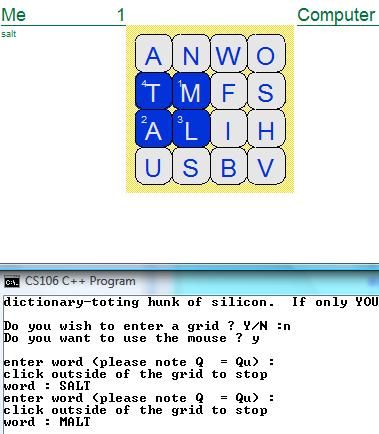
Here is a example of the output of the grid, with the words highlighted “MALT” with each position within the word where it was linked together, e.g M is the first letter thus there is a number 1 within the image on the M.

Boggle - Highlighted words

CS106B Assignment 2 Part 3

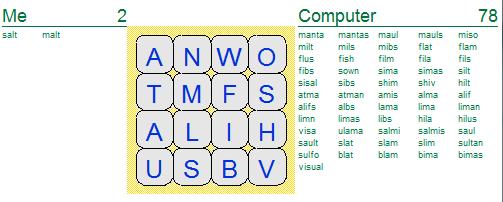
and here is the computer hammering me !!.. he found allot more words than what I did.

Boggle - computer won

CS106B Assignment 2 Part 3

I did do the extensions, so that you can also use the mouse as a input to build up the word to search for by clicking on the characters and also displaying route path of the word was found in the grid.

Also added in some sound to the program, so if the human picks a word that is not in the dictionary/grid then comes back with a sound. I did implement the converting the letter to “Q” to “QU” for the human input to give myself abit more chance!! :) .. but could have added to the computer recursive function because just needed to call the function

string addQU(string theStr)
{
	int findI =0;
	while (true)
	{
		findI = theStr.find("Q", findI);
		if (findI >= 0)
			theStr = theStr.replace(findI,1,"QU");
		if (findI == -1)
			return theStr;
		findI++;
	}
}

Also I did the mouse input, so that it will take a mouse position and find the appropriate letter on the grid, does some maths to find the top left position on the grid and then how far the mouse is from that, then the letters on the grid are 0.5 in size, so divide the distance from there and you get the position.

char getMouseWord(Grid<char> &theBoard, int dimension)
{
	double x = GetMouseX();
	double y = GetMouseY();
	// get the start point
	x -= 1.93;
	y -= 3.1;
	y *= -1;
	int row = (int)(y / 0.5);
	int col = (int)(x / 0.5);
	if ((row < dimension) && (col < dimension))
		return theBoard[row][col];
	else
		return NULL;
}

Here is the computers recursive function, it is very similar to the humans version, but it will search for possible words with the grid and using the startY/startX so that we do not restart the search from point 0,0 on the grid, but where we was last, makes it allot more quicker!!!.

// returns a new word found on the grid, if able to 
string findComputersWord(Grid<char> &theBoard, Lexicon alreadyFoundWords, Lexicon dictionary, Vector<cell> &theRoute, int startY, int startX, string alreadyFound, int placeY, int placeX)
{  
  if (alreadyFound.length() >= MIN_WORD_COUNT)
    if (dictionary.containsWord(alreadyFound))
      if (!alreadyFoundWords.containsWord(alreadyFound))
        return alreadyFound;
  // need to find the first letter within the board and then progress around that.
  if (alreadyFound.empty())
  {
    for (int rows = startY; rows < theBoard.numRows(); rows++)
      for (int cols = startX; cols < theBoard.numCols(); cols++)
        // find the each character within the 
        {
          alreadyFound = theBoard[rows][cols];
          cell newR;
          newR.row = rows;
          newR.col = cols;
          theRoute.add(newR);
          string newWord = findComputersWord(theBoard,alreadyFoundWords, dictionary,theRoute, startY, startX, alreadyFound, rows, cols);
          if (newWord.length() > 0)
            return newWord;
          else
          {
            // clear out the found Board 
            theRoute.clear();
          }
        }
  }
  else
  {
    // try and find the next letters within the area around the base letter
    // spin around the letter 3 * 3 grid
    for (int y= (placeY > 0 ? placeY-1: placeY); y <=(placeY == (theBoard.numRows()-1) ? placeY : placeY+1);y++)
      for (int x=(placeX > 0 ? placeX-1: placeX); x<=(placeX == (theBoard.numCols()-1) ? placeX : placeX+1); x++)
      {
        if (!(y==placeY && x ==placeX))
        {
          // already used letter
          if (!placeAlreadyUsed(y,x,theRoute))
          {
            alreadyFound += theBoard[y][x];
            cell newR;
            newR.row = y;
            newR.col = x;
            theRoute.add(newR);
            if (dictionary.containsPrefix(alreadyFound))
            {
              string newWord = findComputersWord(theBoard, alreadyFoundWords, dictionary,theRoute,startY, startX, alreadyFound, y, x);
              if (newWord.length() > 1)
                return newWord;
              else
              {
                if (theRoute.size() > 0)
                  theRoute.removeAt(theRoute.size()-1);
              }
            }else
            {
              if (theRoute.size() > 0)
                theRoute.removeAt(theRoute.size()-1);
            }
            // if this new line of attack does not work out, clear the foundboard and also the alreadyfound variables.
            if (alreadyFound.length() > 0)
              alreadyFound = alreadyFound.substr(0, alreadyFound.length()-1);
          }
        }
      }
  }
  return "";
}

I have included the source code and the PDF file of the assignment within the attached zip file, it works in Visual Studio 2008.

Warm up recursive problems

Tuesday, June 8th, 2010

This is all about recursive problems and the part 1 of this assignment is warm up problems.

There are two warm up problems, one is Balancing parentheses and the second is Evaluating expressions, so lets start with the Balancing parentheses.

Balancing parentheses

To make sure that a there is opening and closing brackets within a string, the three brackets that we need to search for is {}, () and [] and if they are present in the string basically remove them and then recheck the string until it reaches “” (a empty state). If there is a non empty state of the string then return false, which means that the string is not balanced, here is a example taken from the assignment PDF file,

For example, the string “[(){}]” is shown to be balanced by the following chain of calls:
IsBalanced(“[(){}]“)
IsBalanced(“[{}]“)
IsBalanced(“[]“)
IsBalanced(“”) true

and here is the recursive code that I did come up with, the start is the empty string (str.size() == 0), else it tries to find the any one of the three strings in a for loop (breaks from the for loop if found) and if one is found then recall the IsBalanced function.

bool IsBalanced(string str)
{
	int strPos=-1;
	if (str.size() == 0)
		return true;
	string findStr[] = {"()", "[]", "{}"};
	for (int i =0; i < 3; i++)
	{
		strPos = str.find(findStr[i]);
		if (strPos >=0) 
			break;
	}
	if (strPos >=0)
		return IsBalanced(str.substr(0, strPos) + str.substr(strPos+2));	
	return false;
}

Evaluating expressions

Evaluating expressions is when you have a mathematical equation that you need to equate, so for example as taken from the PDF assignment file

EvalInfixExp(“3″) = 3
EvalInfixExp(“(4 + 8)”) = 12
EvalInfixExp(“(25 – (2 * 10))”) = 5

Where the EvalInfixExp is the function that we call recursive, the way that I thought about this is that if there is no spaces then return the value (e.g. base case) and if there is no brackets in the string then it must be a maths query, which get the two values and the mathematical function (/,+,-,*) and equate them returning that value, but then if there is a “(” at the start, since all equations are valid, then equate inside that ( .. ) brackets, but if there is any ( … ) inside that main ( … ) then figure them out first, which is why I using the first_last_of “(” function to find the the end ( .. ) to equate and then the associated “)”, which in turn we just need to recall the function EvalInfixExp to figure out the value inside the string.

To think about it, what is happening is that is works from the inside to the out finding the values of the ( .. ) to reinsert them back into the string (the result of them that is), so in the end all we do is equate the last mathematical equation.

Here is the cpp recursive function.

int EvalInfixExp(string expString)
{
	// so if the first character is ( then do else do other
	int brackPos1, brackPos2, returnValue =0;
	// try and find the outter ()
	if (expString[0] == '(')
	{
		brackPos1 = expString.find_last_of("(");
		brackPos2 = expString.find_first_of(")", brackPos1);
		// find the value within the () and replace with the new value
		if (brackPos1 >= 0 && brackPos2 >=0)
		{
			brackPos1++;
			returnValue = EvalInfixExp(expString.substr(brackPos1, brackPos2 - brackPos1));
			// need to replace the () with the value 
			brackPos1--;
			expString.replace(brackPos1, brackPos2 - (brackPos1-1), IntegerToString(returnValue));
		}
		return EvalInfixExp(expString);
	}
	else
	{	// find out the actual value of the maths function
		if (expString.find_first_of(" ") < 0 || expString.find_first_of(" ") > expString.size())
			return StringToInteger(expString);
		Scanner theExpScanner;
		theExpScanner.setInput(expString);
		theExpScanner.setSpaceOption(theExpScanner.IgnoreSpaces);
		int firstValue = StringToInteger(theExpScanner.nextToken());
		string op = theExpScanner.nextToken();
		string last;
		while (theExpScanner.hasMoreTokens())
			last += theExpScanner.nextToken();
		int secondValue = StringToInteger(last);
		if (op == "+")
			returnValue = firstValue + secondValue;
		if (op == "-")
			returnValue = firstValue - secondValue;
		if (op == "*")
			returnValue = firstValue * secondValue;
		if (op == "/")
			returnValue = firstValue / secondValue;
		return returnValue;
	}
}

I have attached the full source code and also the PDF assignment code.

Maze Generator

Monday, June 7th, 2010

The maze is basically a X * X grid that has 1 route from the start to the end of the grid.

Here is a picture of the output of a grid with a path/route from the start to the finish.

Maze Generator

CS106B Assignment 2 Part 3

As you can see from the above there is basically one route which can be worked out if you start off with all of the grid cells being classed as blocked (e.g. all walls around the cell are there) and if you then process this grid and make it so that all of the grid cells are linkable so that there is a way around the grid to reach every cell, of course you would only have one way from start to finish.

Then all you need to do is to random check each cell wall and see if it is within the same set of chambers (set of cells that already linked) if not then delete that cell wall else check another wall. So taken from the assignment PDF file (attached) the process, in full, is

  • choose a dimension
  • generate all walls, and shuffle them
  • generate all chambers, where each chamber includes one unique cell
    1. foreach wall in randomly-ordered-walls
    2. if wall separates two chambers
    3. remove wall

I generated the walls and shuffled them by to start with create a grid of cells in a loop (for loops) which build up the horizontal and vertical cells and then go through a for loop again that loops to the size of the cells and this time randomally pick a cell to swap with another cell, this will generated the randomally list of walls to check to see if it separates two chambers.

The way that I checked to see if the wall was between two chambers was to first find the cell on the left within the chambers array (this array would be the dimension * dimension of the grid since there would be a chamber for each cell) and then see if the second cell that is linked to that wall to check is part of the same chamber as the left.

I could have used a Set which contains the method “containsAt” so could find the second cell is within the same chamber as the first, but I used a Vector array because then I could show two ways of doing the find, either using a for loop or a recursive function, I have done this below, the first is the for loop method that will search a Vector of cells (col/row) of a chamber(subChamber) to find a cell (findThisCell), the index is used with the recursive function so just disregard that at present, it will return true if it finds it, else false.

bool findCellInSubChambers(Vector<cell> &subChambers, cell findThisCell, int index)
{
	for (int mainSubSubChamber = 0; mainSubSubChamber < subChambers.size(); mainSubSubChamber++)
	{
		if (subChambers[mainSubSubChamber] == findThisCell)
		{
			return true;
		}
	}
	return false;
}

here is the recursive function that will loop through the chamber of cells (subChamber) the index is started with a value of 0 as the function definition shows below as well. What it does is to go through the array of cells within the chamber (vector array) with using the index value, if has not found at the present index within the array recall this function again with a new index value, but if the index value is higher than the size of the array then return false.

bool findCellInSubChambers(Vector<cell> &subChambers, cell findThisCell, int index =0);
// return true if the cell is within the vector of cells
bool findCellInSubChambers(Vector<cell> &subChambers, cell findThisCell, int index)
{
	if (index < subChambers.size())
	{
		if (subChambers[index] == findThisCell)
			return true;
		else 
			return findCellInSubChambers(subChambers, findThisCell, ++index);
	}
	return false;
}

I did do another for loop and recursive function for searching all of chambers for the first cell of the wall to check for as well, just for fun.

Anyway, here is the main loop code, what it does is to first find the index value of the sub chamber within the main chambers array (findCellInChambers function) which holds the value of the index within the array of chambers, if it is found (it should always be found to be honest, but to just be on the safe side), then check to see if the second cell to check (the other side of the wall) is in the same chamber as the first cell, if not, then remove the wall and add the array of cells that was attached to the second cell to the first cell chamber array, so that we can build up a list of chambers (this should finish off with a all of the chambers being linked).

Vector<wall>::Iterator wallIter = theWalls.iterator();
while (wallIter.hasNext() && (wallI < ((dimension * dimension)-1)))
{
	wall checkThisWall = wallIter.next();
 
	int firstFound = findCellInChambers(chambers, checkThisWall.one);
	if (firstFound >= 0)
	{
		if (!findCellInSubChambers(chambers[firstFound], checkThisWall.two))
		{
			wallI++;
			RemoveWall(checkThisWall);
			int found = findCellInChambers(chambers, checkThisWall.two);
			if (found >= 0)
			{
				for (int foundI = 0; foundI < chambers[found].size(); foundI++)
					chambers[firstFound].add(chambers[found][foundI]);
				chambers.removeAt(found);
			}
		}
	}
}

I have attached the full source code and also the PDF of the assignment.

Word Ladder

Thursday, June 3rd, 2010

This part is a word ladder.

A word ladder is when you move from one word to another with only changing 1 letter, so for example if you wanted to move from dog to bog, then you are just altering one letter (the “d” to a “b”), but if you are going from code -> data, then you would have to go through a couple of changes to get to the end word.

code -> cade -> cate -> date -> data

as you can tell we have only altered one letter at a time to move from one point of the linking words to another.

But if there is no linking words that we need to stop the program, because there is no link between the two words in that case and also if we have already used a word for a test sequence then do not use that word another for another sequence. (breath-first-searching).

So what we need to do is to have a way of finding another word with just changing one of the letters within the linking words, so, if we alter each letter within a word and make sure it is actually a word within a dictionary (and of course we have not already used that word before) then return that word as a new search pattern. This is what the below function (findNextWord) does, the parameters are word (the base word), dictionary (the dictionary to make sure that the new word is a word) and the alreadyUsed is the list of already used words.

string findNextWord(string word, Lexicon dictionary, Lexicon alreadyUsed)
{
	string newWord;
	for (int i =0; i < word.length(); i++)
	{
		newWord = word;
		for (char ch = 'a'; ch <= 'z'; ch++)
		{
			// create a new word
			newWord = newWord.replace(i,1,1, ch);
			// make sure it is a valid word and also not already used
			if (dictionary.containsWord(newWord))
				if (!alreadyUsed.containsWord(newWord))
					return newWord;
		}
	}
	return "";
}

Next since there could be allot of different words created from a 4 letter word, which in-turn would allow for different paths to take then what we need to do is to add the next word gained from the above function to the already path that we have taken and insert that into a queue (first in and first out), this queue will have all of the paths that we are testing in ordered of length to see if we are able to get to the end word. For example lets say with the code – data test, the queue may look like this after the first round, where the words are in a array

queue top
code -> cade

code -> node
code -> tode

queue bottom

so this means that we will always check to see if any of the 2 length linking paths can get to the end, and then process them in order and place the 3 length linking paths afterwards for example (we have take the code->cade from the top to process)

queue top
code -> node
code -> tode
… (other 2 length paths)
code -> cade -> cate
code -> cade -> kade

k. kade is a name, but could be in the dictionary, but you get the point, 2 length paths will be checked first and then 3 length paths until we reach the end word.

So this is how I done the it, added the start word to the queue, then looped, take off the next element, search for another word, if the next word is the end word stop, else add to the queue of searchable paths and also add to the list of already used words, below is the source code

void processMainGame(Lexicon dictionary, string startWord, string endWord)
{
	Queue<Vector<string> > theFIFO;
	Lexicon alreadyUsed;
	string nextStr;
 
	theFIFO.clear();
	Vector<string> addToQueue;
	addToQueue.add(startWord);
	// start the queue
	theFIFO.enqueue(addToQueue);
 
	while (true)
	{
		// build up a new list of items to search, or stop if empty
		if (theFIFO.size() ==0)
		{
			cout << "Nope nothing found! no ladder"<< endl;
			break;
		}
		Vector<string> newString = theFIFO.dequeue();
		while (true)
		{
			// find the next word to use
			nextStr = findNextWord(newString[newString.size()-1], dictionary, alreadyUsed);
			// the end of the search
			if (nextStr == endWord) 
			{
				cout << "FOUND ladder !!" << endl;
				foreach (string list in newString)
				{
					cout << list << " - ";
				}
				cout << endWord << endl << endl;
				return;
			} else if (nextStr != "")
			{
				// if there is another word to search with add to the end of the list
				Vector<string> addMore = newString;
				addMore.add(nextStr);
				theFIFO.enqueue(addMore);
			}
			// else if nothing left to search for stop!!
			else if (nextStr =="")
				break;
			alreadyUsed.add(nextStr);
		}
	}
}

I have attached the source code and also the PDF file of the assignment.

Random Writer (Markov)

Thursday, June 3rd, 2010

This is to implement a Markov approach to predicting what is going to happen next with using what has happened before. For example, for handwriting, if you see the letters “TH” and there is one letter left but you are not able to read it, then you could guess it could be the letter “E”, well that is kinder the idea.

So, in this assignment what is required is to read in a file, any file story etc, and then create seeds (which is a user requested input) with the next character(s) that are linked to that seed. To understand what a seed is, lets say that we have a line of text

“Hi there, my knickname is genux, and I enjoy to do software development, in many languages and operating systems, because development is just interesting!!”

and we picked a seed length of 3, so to start with the first seed is “Hi ” <- yep there is a space there!! because it has to be a length of 3, and the next character is "t" which is what is linked to the seed value "Hi ", so from the text above with a seed length of 3 you can see that there is a seed of "ent" (within the development words for example) has two choices to make for the next character either a "," or a " " and this is the random choice of where to go after this test. If you went to " " then the new seed would be "nt " which there is only one next possible seed which is "t i" and you just carry on like this.

To start with this problem, I wanted to create a mapped seeds that had attached the next characters that are linked to that seed value, so it would be a

Map<Vector<char>  > theKeys

which means that we are using a map (seed is the string key) and then a vector or char(acter(s)) that are associated with that seed. So then we need to read in the value and insert into the map, so here is the way that I am using to insert a character into vector associated with the mapped seed key. What I am doing is to start with, to see if there is already a seed within the map already, if so create a vector of values that is already associated with that seed key, either or, insert the new (insertChar) into the vector and place into the map seed key (if you use the put method if will replace the previous values associated with that key).

inline void addNewChar(Map<Vector<char> > &theKeys, string seedValue, char insertChar)
{
	Vector<char> addResults;
	if (theKeys.containsKey(seedValue))
		addResults = theKeys.get(seedValue);
	addResults.add(insertChar);
	theKeys.put(seedValue, addResults);
}

the next thing is to start with reading the seed start length from the file (the readSeedFromFile method will do that and return the string of its value), then whilst there is characters left in the file keep on reading the file whilst inserting the seed and characters into the mapped variable (Map > &theKeys).

void setupKeys(Map<Vector<char> > &theKeys, ifstream &infile, int seed)
{
	// obtain the first seed value
	string seedValue = readSeedFromFile(infile,seed);
	char newChar;
	while (!infile.eof())
	{
		newChar = nextChar(infile);
		addNewChar(theKeys, seedValue, newChar);
		seedValue = seedValue.substr(1,seedValue.length()-1) + newChar;
	}
}

So after we have read in the file, we need to find the highest seeded that has the most next characters attached to it, and this what the function below does, the foreach is a iterator that will loop through all of the seed (key) values within the Map and then find the length of the next characters.

string obtainAMaxKey(Map<Vector<char> > &theKeys)
{
	int maxSeed =0;
	string maxKey="";
	Vector<char> values;
	// iterator through the map values
	foreach (string key in theKeys)
	{
		values = theKeys.get(key);
		if (values.size() > maxSeed)
		{
			maxKey = key;
			maxSeed = values.size();
		}
	}
	return maxKey;
}

the last thing is to output the Markov, stop at a word count of 2000 or if there is no more characters attached to the last seed value. So all we do is start with the seed value from above function, then just get the Vector from the seed, then pick a random number from the length of that Vector and update the seed to the next seed. As below.

void outputMarkov(Map<Vector<char> > &theKeys, string startKey)
{
	Randomize();
	int wordCount = startKey.length(), randomKey;
	Vector<char> values;
	while (true)
	{
		if (wordCount >= 2000) break;
		values = theKeys.get(startKey);
		if (values.size() ==0) 
		{
			cout << "NO MORE KEYS"; 
			break;
		}
		randomKey = RandomInteger(0,values.size()-1);
		cout << values[randomKey];
		startKey = startKey.substr(1,startKey.length()-1) + values[randomKey];
		wordCount++;
	}
}

I have attached the zip file with also the PDF file of the requirements. It will work within visual studio 2008