Problem 1

To start off with, I am using Eclipse and have attached my settings to get it to work with this assignment.

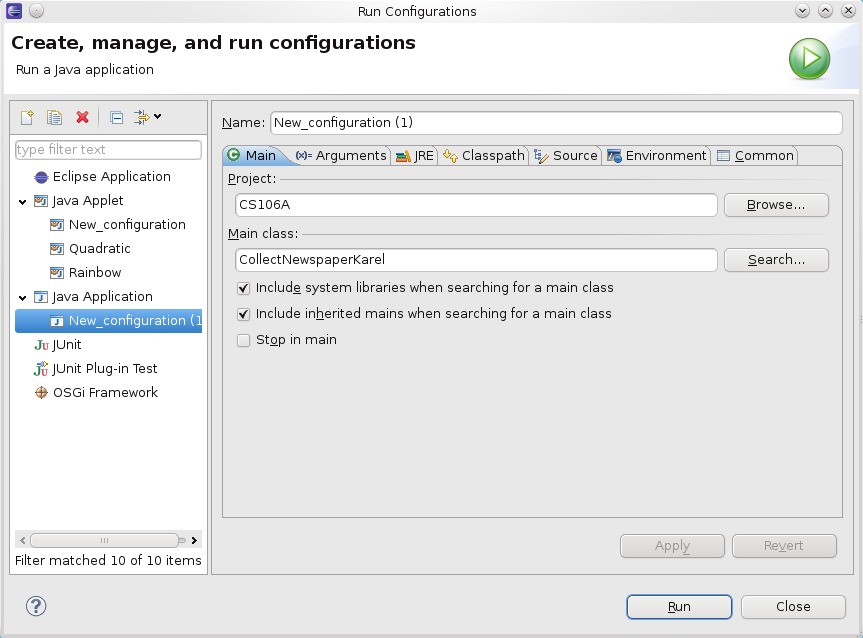
And now to actual run the code you need to include some things from the acm.jar file, since that is what is mainly being used to hide allot of the Java main implementations. So if you goto the the Package Explorer on the left hand side, and double click on the Package->default packages->CollectNewsPaper.java then to setup the environment for running this java file you need to goto Run->Run Configurations.. on the left options make sure that Java Applications -> New configuration is selected and then select the Project name as the Package and then tick the “include system libraries when searching for the main class” and also the “include inherited mains when searching for the main class”, then on the “main class” option, click search and find the CollectNewsPaper. Here is a image of how it should look.

Eclipse CS106A settings

Now, you should just see a robot (Karel) in the top left of the house and that is about it, we need to write the run() method for him to pick up the newspaper, so alter the code to the below.

/*
 * File: CollectNewspaperKarel.java
 * --------------------------------
 * At present, the CollectNewspaperKarel subclass does nothing.
 * Your job in the assignment is to add the necessary code to
 * instruct Karel to walk to the door of its house, pick up the
 * newspaper (represented by a beeper, of course), and then return
 * to its initial position in the upper left corner of the house.
 */
 
import stanford.karel.*;
 
public class CollectNewspaperKarel extends SuperKarel {
 
	private void getPaper()
	{
		move();
		turnRight();
		move();
		turnLeft();
		move();
		move();
	}
 
	private void pickUpPaper()
	{
		pickBeeper();
	}
 
	private void goBack()
	{
		// turn around basically
		turnRight();
		turnRight();
		move();
		move();
		move();
		turnRight();
		move();
		turnRight();
	}
 
	public void turnLeft()
	{
		turnRight();
		turnRight();
		turnRight();
	}
 
	// You fill in this part
	public void run()
	{
		getPaper();
 
		pickUpPaper();
 
		goBack();
	}
}

and then run again and if you click “start” he will go and pick up the newspaper and return back to where he started from.

I am finding this CS106A fun. In the above zip file there is the full source code for all of the parts to assignment 1, and also the assignment in a PDF file. But I shall place each part on a different post.

Threading – run another part of the program in a separate process

Threading in Java is very similar to the threading in c#, just like the example that I did before (threading in c sharp, running different-parts-of-the-program-at-once. What threading does is to allow for a part of your program to be run from within another process, this process runs normally independently of the main program (you can have links if you wanted to so some memory references).

The operating system gives the impression that it is running allot of programs at the same time, but what is happening that allot of processes (programs) have access to the CPU for a limited amount of time, e.g. 10 milliseconds, and then leave the CPU execution stage whilst another process will enter there CPU execution stage (this is the part where the program is actually doing something).

So lets say that you want to spawn off another process that will talk to a server to get information back e.g. a tab browsing on a modern web browser, whilst you look at another part of the main program e.g another tab, and communicate with that one e.g. type in your login details etc.

So let start with a example of how to create a thread-able program. Here my class basicThread extends the class Thread, which encapsulate the thread-able interface.

public class basicThread extends Thread {

this thread-able interface basically only wants to have the method “run” implemented”, since that is what is called when you start the new thread.

	public void run()
	{
		System.out.println("Before my sleep");
		for (int i =0; i < 10; i++)
		{....

and then in your main program you just need to create a basicThread class and call the start method (from the Thread class that basicThread class inherited from)

		// create the thread, a thread is independent of the main program
		basicThread me = new basicThread();
		// then start it. this calls the run method
		me.start();

and that is it, it will spawn off another process that will run separately in time from the main process.

Here is the full source code, I have also included a file zip that has the source code and also the class files attached, save this as callThread.java

public class callThread {
	public static void main(String[] args) {
		// create the thread, a thread is independent of the main program
		basicThread me = new basicThread();
		// then start it. this calls the run method
		me.start();
 
		// so if the basic thread had that pause it in..
		System.out.println("main thread here!!");
		for (int j =0; j < 5; j++)
		{		
			System.out.println("Mainthread about to sleep at number : "+j);
			// need to pause the main thread
			try{
			  Thread.currentThread().sleep(100);//sleep for 1000 ms
			}	catch(Exception ie){
			}
		}
		System.out.println("End of the main thread");
 
	}
 
}

save this as basicThread.java

public class basicThread extends Thread {
	public void run()
	{
		System.out.println("Before my sleep");
		for (int i =0; i < 10; i++)
		{
			System.out.println("basicThread sleeping at number : "+i);
			try {
				sleep(45);
			} catch (InterruptedException e)
			{
				System.out.println("could not sleep long enought there was a error!!");
			}
 
		}
		System.out.println("after the sleep :)");
	}
}

here is the output, as you can see the mainthread and the basicthread outputs interrupt each other just like any other process does within a CPU.

main thread here!!
Before my sleep
Mainthread about to sleep at number : 0
basicThread sleeping at number : 0
basicThread sleeping at number : 1
basicThread sleeping at number : 2
Mainthread about to sleep at number : 1
basicThread sleeping at number : 3
basicThread sleeping at number : 4
Mainthread about to sleep at number : 2
basicThread sleeping at number : 5
basicThread sleeping at number : 6
Mainthread about to sleep at number : 3
basicThread sleeping at number : 7
basicThread sleeping at number : 8
Mainthread about to sleep at number : 4
basicThread sleeping at number : 9
after the sleep :)
End of the main thread

Threading – running different parts of the program at “once”

A thread is when you “spawn” off another process (a process is like another program running within itself).

The operating system gives the impression that it is running allot of programs at the same time, but what is happening that allot of processes (programs) have access to the CPU for a limited amount of time, e.g. 10 milliseconds, and then leave the CPU execution stage whilst another process will enter there CPU execution stage (this is the part where the program is actually doing something).

To start with lets first create a method that is run within new thread, here we are just going to output a message and sleep for a bit, loop this over for 10 times.

// the method to create as a threadable method
public static void RunThisMethod()
{
	for (int i =0; i < 10; i++)
	{
		Console.WriteLine("RunThisMethod number : "+i.ToString() + " Sleep for 45");
		Thread.Sleep(45);
	}
}

Now lets create a thread, since a Thread has to be a delegated method but with .net 2 and above the .net environment will pick the correct delegate for you, so this means that you can just pass in the method name to the Thread class and that is it

	Thread theThread = new Thread(RunThisMethod);

To start the new Thread, it is as easy as start

	theThread.Start();

Here is the full source code, for demoing how the main and the runMyMethod flip between each other (e.g. each process has time in the processor(s) to run)

using System;
using System.Threading;
 
namespace myThread
{
	class MainClass
	{
		public static void Main (string[] args)
		{
			// initialize the RunThisMethod as a thread
			Thread theThread = new Thread(RunThisMethod);
			theThread.Start();
 
			for (int j = 0; j < 5; j++)
			{
				Console.WriteLine("Main method number : "+j.ToString()+" Sleep for 100");
				Thread.Sleep(100);
			}
		}
 
		// the method to create as a threadable method
		public static void RunThisMethod()
		{
			for (int i =0; i < 10; i++)
			{
				Console.WriteLine("RunThisMethod number : "+i.ToString() + " Sleep for 45");
				Thread.Sleep(45);
			}
		}
	}
}

and here would be the output

Main method number : 0 Sleep for 100
RunThisMethod number : 0 Sleep for 45
RunThisMethod number : 1 Sleep for 45
RunThisMethod number : 2 Sleep for 45
Main method number : 1 Sleep for 100
RunThisMethod number : 3 Sleep for 45
RunThisMethod number : 4 Sleep for 45
Main method number : 2 Sleep for 100
RunThisMethod number : 5 Sleep for 45
RunThisMethod number : 6 Sleep for 45
Main method number : 3 Sleep for 100
RunThisMethod number : 7 Sleep for 45
RunThisMethod number : 8 Sleep for 45
Main method number : 4 Sleep for 100
RunThisMethod number : 9 Sleep for 45

iterators – external wrapping of a class

As from the previous iterator post that wraps around a class (or within it as such, since that is where the implementation is). Here I am showing how to do some external wrapping of the class.

Since I am using Linux (with the KDE GUI) with a develop environment called kDevelop I have included the files with there full source code in the above zip file.

In essence the iterator interfaces (abstract classes that make you implement the methods required to allow for the iterator to work) are as defined as

template <class T>
class iteratorInterface
{
    virtual bool hasNext() = 0;
    virtual T next() = 0;	// next will also return the value
    virtual T getValue() = 0;
};
 
template <class T>
class iteratorInterfaceBaseClass
{
     virtual T begin() = 0;
     virtual T end() = 0;
};

when the actual class that is going to have a iterator external wrapper will implement the iteratorInterfaceBaseClass interface (abstract class with pure virtual functions “virtual T begin() = 0” where the “=0” is the pure part). Here is the class that is going to have a iterator external wrapping, if you notice it also implements the iteratorInferfaceBaseClass, with the anotherStackIterator being the actual iterator for the anotherStack class.

class anotherStack : public iteratorInterfaceBaseClass<anotherStackIterator>
{
  private:
    int intArray[MAXSIZE];
    int lastAdded;
 
  public:
    anotherStack();
 
    bool addValue(int value);
    bool addValueAt(int value, int place);
 
    int returnValueAt(int place);
 
    // for the iterator, return this and also NULL basically
    anotherStackIterator begin();
    anotherStackIterator end();
};

and here is the anotherStackInterface class structure, this does the implementation of a standard (std::) iterator in a forward direction (std::forward_iterator_tag) with returning a int (eger) value.

class anotherStackIterator : public iteratorInterface<int>, public std::iterator<std::forward_iterator_tag, int>
{
  private:
      int theStackRef;
      anotherStack *theStack;
 
  public:
      anotherStackIterator(anotherStack *stackP)  : theStack(stackP) { theStackRef = 0;}
 
      bool operator==(const anotherStackIterator otherValue);
      bool operator!=(const anotherStackIterator otherValue);
      int operator++();
      int operator++(int);
 
      // as from the iteratorInterface
      bool hasNext();
      int next();
      int getValue();
};

in essence all you are doing is looping through the data that you implemented in the main class (anotherStack) how you want to, for example when you want to setup the iterator and then loop through like this

    anotherStack stacky;
    stacky.addValue(4);
    stacky.addValue(2);
    stacky.addValue(10);
 
 
    for (anotherStackIterator iter = stacky.begin(); iter!=stacky.end(); iter++)
    {
	printf("value %d\n", iter.getValue());
    }

the iterator (iter) has to implement the iter++ process, a way to increment the pointer to the next data item within the anotherStack data structure and here is how it is done

int anotherStackIterator::operator++()
{
    if (theStackRef < MAXSIZE)
      theStackRef++;
    return theStack->returnValueAt(theStackRef);
}

the theStackRef is just a integer value that holds the place within the integer array from the anotherStack class and all is what is returned a value within the data structure, but because in the loop there is a test against if the iterator value has reached the end of the array e.g. the != (not equal to) and here is the test for that

bool anotherStackIterator::operator!=(const anotherStackIterator otherValue)
{
    if (theStackRef >=MAXSIZE) 
	return false;
    if (otherValue.theStack == NULL)
	return true;
    return (theStack->returnValueAt(theStackRef) != otherValue.theStack->returnValueAt(otherValue.theStackRef));
}

the full source code is included within the zip file attached. I had fun doing this.

loading images on the fly

To load a image from the server, local or remote depending if you are developing locally. I have been using monodevelop with the moonlight addin, this allows you to create silverlight applications with Linux :).

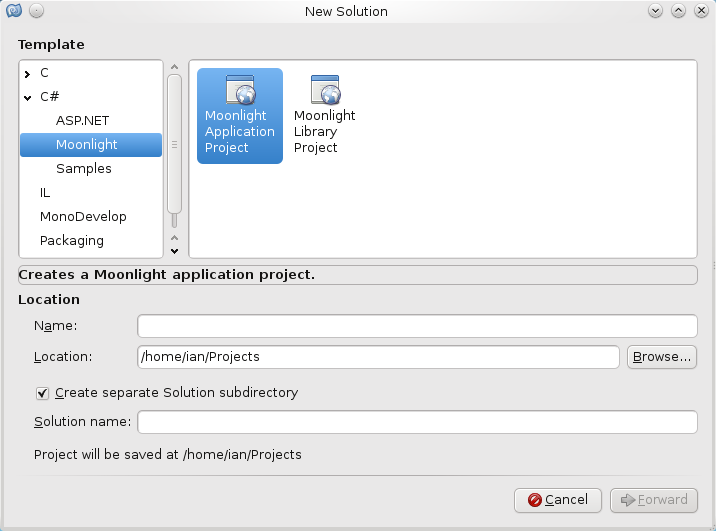
To start with, if you create a new solution by going to File->New->Solution and then selecting the moonlight Application project as similar to creating any other new project within monodeveloper (or within visual studio if you are using visual studio to create this silver light loading images on the fly).

Moonlight mono-develop project setup

And then within your main page.xaml file you need to define where you want the image to be placed.

		<Image x:Name="Image1" Source="dot.jpeg"></Image>
		<Button x:Name="Button1" Click="ButtonClick" Height="50" Content="Click" ></Button>

above also includes the Button that you are going to click onto to load the image, in this case it will call the ButtonClick function (from the above it is the “click” method). The ButtonClick is behind the page.xaml within the page.xaml.cs file (the csharp file).

So once that button has been clicked it will call this function

		public void ButtonClick(System.Object sender,System.EventArgs eventy)
		{
			System.Windows.MessageBox.Show("hi there");
			Image1.Source = new BitmapImage(new Uri("lcd.png", UriKind.Relative));
		}

I put a little message pop up window to say “hi there”, just so that you know it have been clicked encase the lcd.png (as taken from the open clip art website here) is not in the correct place, in this case it is placed within the bin/debug, but if you are using a release edition or using visual studio you may have somewhere else.

I have included the full source code and image within a zip file above, please feel free to download.

Here is the full page.xaml if you want to look over it.

<UserControl xmlns="http://schemas.microsoft.com/winfx/2006/xaml/presentation" 
             xmlns:x="http://schemas.microsoft.com/winfx/2006/xaml" 
             Width="500" Height="350"
             x:Class="moonlighttest.Page"
>
	<Grid x:Name="LayoutRoot" Background="Black">
		<Image x:Name="Image1" Source="dot.jpeg"></Image>
		<Button x:Name="Button1" Click="ButtonClick" Height="50" Content="Click" ></Button>
	</Grid>
</UserControl>

and here is the full page.xaml.cs file.

using System;
using System.Collections.Generic;
using System.Windows;
using System.Windows.Controls;
using System.Windows.Media;
using System.Windows.Media.Imaging;
 
namespace moonlighttest
{
 
	public partial class Page : UserControl
	{
 
		public Page ()
		{
			this.InitializeComponent ();
		}
 
		public void ButtonClick(System.Object sender,System.EventArgs eventy)
		{
			System.Windows.MessageBox.Show("hi there");
 
			Image1.Source = new BitmapImage(new Uri("lcd.png", UriKind.Relative));
		}
	}
 
}

iterator – wrapping around a class

An iterator is when you implement a abstract way of cycling through data. I have below created a internal iterator wrapper that will allow the class to implement a iterator for that class. Below the class is kinder like a stack where you place one item at the root of the stack and then place another item in a link (next item) attached to the last node of the stack (where the last item is, be it at the root if empty)

You can create a wrapper for the class externally as well, but in this instance I am creating it internally.

To start with I have created a internal class within the stack class called a Node, the Node is the item on the stack (the data inserted in a array as such). Also I created a basic class definition at the top the class so that the rest of the class knows that there is a thing called a Node, but the implementation is below.

    // forward declaration for the class structure below.
    class Node;

As said before, there is a root node that, this is where the start of the array in essence is, and the last node, where the last inserted node as placed. On each node there is a method to return the value attached to that node and also a link to the next node on the linked list.

    class Node {
    public:
	Node(const int& val) : nextNode(NULL), nodeValue(val) {}
	int& getVal() {return(nodeValue);}
	Node* nextNode;
    private:
	int nodeValue;
    };

now we have the node class setup, which means that when we add to the stack we can now place the values added to a dynamic linked list and a way to go through them. Now we just need to add values into the stacked list.

void theStack::addValue(int valueToAdd)
{
    if (rootNode == NULL)
    {
	rootNode = new Node(valueToAdd);
	lastNode = rootNode;
    }else
    {
	Node* p = new Node(valueToAdd);
	lastNode->nextNode = p;
	lastNode =p;
    }
}

this will place the new item either at the root node or attached to the next node to the last added node and then re-sets the last node added to point to where the new node, so that when another node is added it will be added in the correct place.

Here comes the iterator part.

To start with the internal part of the class, the internal iterator wrapper as such, we use the iterator class to extend/implement the iterator functions that we have to implement for the iterator aspects to work, here I am using the forward_iterator_tag as part of the parameter to the iterator and also we are returning a int value (which is what the stack is implementing as a linked list of integers, if you want to return another type just put in what ever your return type is.

  class Iterator : public iterator<forward_iterator_tag, int>

here are function/methods of a iterator to allow the stack iterator to go through the linked list (array of integers).

  class Iterator : public iterator<forward_iterator_tag, int>
  {
    private: 
      // the intP is a integer pointer
	Node* intP;
    public:
	Iterator(Node* p) : intP(p) {}
	~Iterator() {}
 
	// assignment 
	Iterator& operator=(const Iterator& otherValue);
	// equal or not equal to
	bool operator==(const Iterator& otherValue);
	bool operator != (const Iterator& otherValue);
	// increment the pointer to the next value
	Iterator& operator++();
	// increment the pointer to the next next etc value
	Iterator& operator++(int);
 
	// return type here is a int because that is what I said at the top of the class setup
	// e.g. iterator<forward_iterator_tag, int>
	int& operator*();
   };

of course we need to know when the begin and the end of the linked list is, this is the root and the last nodes, for a iterator to know where to start and end when you are going from start to end with using a iterator style of coding. Here is a way of using the iterator to loop through the values added, below is code that setups up the stack (theStack) class with some values (5,10,3), and then using a for loop to go through the values within the linked list (this is where the iterator part comes in)

    theStack stacky;
 
    stacky.addValue(5);
    stacky.addValue(10);
    stacky.addValue(3);
 
    printf("Value in the stack was\n");
    for (theStack::Iterator theIterator= stacky.begin(); theIterator != stacky.end(); theIterator++)
    {
	// (int) wrapping the return value into a int type, *theIterator getting the pointered to value
	printf("%d\n", ((int)*theIterator));
    }

in the full source code below is the implementations of the iterator and the stack

#include <iostream>
#include <iterator>
#include <stdio.h>
 
using namespace std;
 
class theStack
{
    private:
    // forward declaration for the class structure below.
    class Node;
 
    // the pointers to the root nodes and the last node on the stack as such.
    Node* rootNode;
    Node* lastNode;
 
  public:
      theStack(): rootNode(NULL), lastNode(NULL) {}
      ~theStack() { delete rootNode; }
 
      // add objects to the DrawingObject
      void addValue(int valueToAdd);
 
 
  class Iterator : public iterator<forward_iterator_tag, int>
  {
    private: 
      // the intP is a integer pointer
	Node* intP;
    public:
	Iterator(Node* p) : intP(p) {}
	~Iterator() {}
 
	// assignment 
	Iterator& operator=(const Iterator& otherValue);
	// equal or not equal to
	bool operator==(const Iterator& otherValue);
	bool operator != (const Iterator& otherValue);
	// increment the pointer to the next value
	Iterator& operator++();
	// increment the pointer to the next next etc value
	Iterator& operator++(int);
 
	// return type here is a int because that is what I said at the top of the class setup
	// e.g. iterator<forward_iterator_tag, int>
	int& operator*();
   };
 
   // the begin and end of the iterator look up
   Iterator begin();
   Iterator end();
 
   //  here we define the Node class
  private:
    class Node {
    public:
	Node(const int& val) : nextNode(NULL), nodeValue(val) {}
	int& getVal() {return(nodeValue);}
	Node* nextNode;
    private:
	int nodeValue;
    };
 
};
 
int main(int argc, char **argv) {
    theStack stacky;
 
    stacky.addValue(5);
    stacky.addValue(10);
    stacky.addValue(3);
 
    printf("Value in the stack was\n");
    for (theStack::Iterator theIterator= stacky.begin(); theIterator != stacky.end(); theIterator++)
    {
	// (int) wrapping the return value into a int type, *theIterator getting the pointered to value
	printf("%d\n", ((int)*theIterator));
    }
    return 0;
}
 
 
void theStack::addValue(int valueToAdd)
{
    if (rootNode == NULL)
    {
	rootNode = new Node(valueToAdd);
	lastNode = rootNode;
    }else
    {
	Node* p = new Node(valueToAdd);
	lastNode->nextNode = p;
	lastNode =p;
    }
}
 
 
// the definitions of the class theStack
// Iterator class implementations 
theStack::Iterator& theStack::Iterator::operator=(const Iterator& otherValue)
{
  intP = otherValue.intP;
  return (*this);
}
 
bool theStack::Iterator::operator==(const Iterator& otherValue)
{
    return (intP == otherValue.intP);
}
 
bool theStack::Iterator::operator != (const Iterator& otherValue)
{
    return (intP != otherValue.intP);
}
 
// increment the pointer to the next value
theStack::Iterator& theStack::Iterator::operator++()
{
    if (intP != NULL)
      intP = intP->nextNode;
    return (*this);
}
 
// if the loop has a increment by more than 1 then just increment the value still by one.
// if you are implementing another stack then you could get to the next next next etc nodes
theStack::Iterator& theStack::Iterator::operator++(int)
{
    if (intP != NULL)
      intP = intP->nextNode;
    return (*this);
}
 
int& theStack::Iterator::operator*()
{
    return(intP->getVal());
}
 
theStack::Iterator theStack::begin()
{
  return(Iterator(rootNode));
}
 
theStack::Iterator theStack::end()
{
  return(Iterator(NULL));
}

Output would be

Value in the stack was
5
10
3

Loading a image on the fly

In flash you can load images from a remote server on-the-fly whilst the flash is running within the browser, here I am going to show how to load a image into a Image tag.

To start off you need to setup the environment to compile up the flash code into SWF file, (here is a previous tutorial where I have created the development environment for flash in creating the classic hello world)

As a side note, the image that I am loading I have taken from the openclipart website and it is off a laptop which I have made slightly smaller to load into the embed object within the HTML (web) page.

To start off, we first create a flash tag of Image (mx is the subscript as such of the flash library) with having the id of imageLoad, we can access the tag within the actual code, and then create a Button which once clicked calls a function called “loadImageIntoImageBlock” the event that is attached to the function is what happened to call this function which would be a mouse event.

	<mx:Image x="30" y="30" id="imageLoad" />
	<mx:Button label="Click here to load image" click="loadImageIntoImageBlock(event)" />

and now when the Button has been clicked we just need to call the function, which is below, the imageLoad is the ID name from the mx:Image above and then just need to alter the source to the image that is in the same place as the swf file.

private function loadImageIntoImageBlock(e:MouseEvent):void {
	imageLoad.source = 'johnny_automatic_laptop.png';
}

that is about it, here is the full source code, if you call this imageload.mxml

<?xml version="1.0" encoding="utf-8"?>
<mx:Application xmlns:mx="http://www.adobe.com/2006/mxml" layout="absolute">
	<mx:Image x="30" y="30" id="imageLoad" />
	<mx:Button label="Click here to load image" click="loadImageIntoImageBlock(event)" />
	<mx:Script>
		<![CDATA[
			private function loadImageIntoImageBlock(e:MouseEvent):void {
				imageLoad.source = 'johnny_automatic_laptop.png';
			}
		]]>
	</mx:Script>
</mx:Application>

I always place my swf files within a bin directory, so if you create a bin directory where the above imageLoad.mxml file is and then run this (once your development environment is setup e.g. the PATH variable to find the mxmlc executable file), once that is place you can compile up the code into a swf by

mxmlc imageload.mxml -output ./bin/imageload.swf

which places the imageLoad.swf into the bin directory that was created.

Here is the web page code that will load the imageLoad.swf into a web page, if you save this as loadingimage.html within the same bin directory as above with the ‘johnny_automatic_laptop.png’ image within the same bin directory you can then open up the html page within your favourite web browser (Firefox) and then click on the button and it will load in the image. hey presto

<html>
<body>
<embed src="imageload.swf" width="560" height="560">
</body>
</html>