ArrayList and ListIterator

An ArrayList is basically a array of objects that are managed within a List interface. This basically means that Java will do the management of the List and you just need to either add to that list/change the values/remove items.

The way that the ArrayList is defined is using the Generics syntax, since a ArrayList can be of any type.

ArrayList<String> names = new ArrayList<String>();

this will create a object called “names” that have a array of type String and to add names to the array you use the “add” method, the “add” method can either just have the ArrayList type (in this case a String) as a single parameter or a index into the ArrayList with the ArrayList type again.. e.g.

// normal add
names.add("Genux");
// adding at a set point
names.add("1","Genux at point 1");

to remove at a set point, there is a method called “remove” that will either take a index point or a class (e.g. will compare against a class within the ArrayList to see if there is anything that equals, if so remove from the ArrayList), in the example below I am just going to use the index point to remove from the ArrayList

names.remove(0);

you can also alter any of the names within the ArrayList with using the method “set”, here I am altering the index point 0 within the array to have the String value of “Genux new start”

names.set(0,"Genux new start");

The ListIterator is when you can iterate through a List (interface implemented object e.g ArrayList), to iterate through a list you basically go from one to the next to the next etc. the ArrayList object called names has a method that will return the list iterator object for the ListIterator to go through, the hasNext method within the ListIterator returns true if there is another value/object after the present one, the “next” method within the ListIterator returns a value/object of the type of ListIterator and then goes to the next value within the List, here is some code that uses the above that uses the hasNext and next methods.

ListIterator<String> arrayListIt = names.listIterator();
while (arrayListIt.hasNext())
{
	System.out.println("Names :"+ arrayListIt.next());
}

here is the source code in full, if you save as “ArrayListTutorial.java”

import java.util.ArrayList;
import java.util.ListIterator;
 
public class ArrayListTutorial {
 
	public static void main(String[] args) {
			ArrayList<String> names = new ArrayList<String>();
			// add names in a standard way, placing on the end in this case the start position = 0 
			names.add("Genux");
			// adding a set point
			names.add(1,"Genux at point 1");
 
			System.out.println("Starting point of the Array of names");
 
			// a ListIterator is a template (e.g. can use any type String/Integer etc) 
			// that will loop through a List object (in this case the ArrayList has implemented a List interface)
			ListIterator<String> arrayListIt = names.listIterator();
			while (arrayListIt.hasNext())
			{
				System.out.println("Names :"+ arrayListIt.next());
			}
 
			System.out.println("Alerting the starting name");
			// change the start of the array list e.g. point 0
			names.set(0,"Genux new start");
 
			// loop through the array list with a iterator
			arrayListIt = names.listIterator();
			while (arrayListIt.hasNext())
			{
				System.out.println("Names :"+ arrayListIt.next());
			}
 
			System.out.println("Removing index 0 from the ArrayList of names");
			names.remove(0);
			// loop through the array list with a iterator
			arrayListIt = names.listIterator();
			while (arrayListIt.hasNext())
			{
				System.out.println("Names :"+ arrayListIt.next());
			}
	}
}

and the output would be

Starting point of the Array of names
Names :Genux
Names :Genux at point 1
Alerting the starting name
Names :Genux new start
Names :Genux at point 1
Removing index 0 from the ArrayList of names
Names :Genux at point 1

to compile if you save the java code above as “ArrayListTutorial.java”

javac ArrayListTutorial.java
java ArrayListTutorial

PHP SOAP server and .NET Client

On a previous post, it was the other way around a .NET SOAP server and a PHP client and this one is a PHP SOAP server talking to a .NET client. I am using a similar PHP SOAP Server output as before, but having to alter the return type to a complexType instead of a normal PHP SOAP server type.

The basic WSDL generation is very similar to the previous SOAP post, apart from parameter passed the Zend_Soap_AutoDiscover which is “Zend_Soap_Wsdl_Strategy_ArrayOfTypeComplex”, which creates the start of the newer return complexTypes.

if(isset($_GET['wsdl'])) {
    $autodiscover = new Zend_Soap_AutoDiscover('Zend_Soap_Wsdl_Strategy_ArrayOfTypeComplex');
    $autodiscover->setClass('QuoteOfTheDay');
    $autodiscover->handle();

here is the new return type for the function to return, it is a class that has public variable that is a string (you define as “” which sets up a string in PHP)

// the return class type
class theQuote {
// have a return value of type string
/** @var string */
  public $getTheQuote="";
}

and then just alter the phpDoc notation for the auto discovery with the Zend SOAP to create a return of theQuote class as above and alter the return variable to the class., below I have included the new WSDL output generated.

  /* phpdoc notation to return a complex type (a class) */
  /**
  * @return theQuote
  */
 function getQuote($quote) {
    $theQuoteR = new theQuote();
    /* just encase the string is in uppercase*/
    $symbol = strtolower($quote);
    /* if there is a quote for the day requested */
    if (isset($this->quotes[$quote])) {
      $theQuoteR->getTheQuote=$this->quotes[$quote];
      return $theQuoteR;
    } else {
      /* else error with default response*/
      $theQuoteR->getTheQuote=$this->quotes["monday"];
      return $theQuoteR;
    }
  }

here is the full source code for the PHP SOAP server

<?php
/* setup the including path for the zend library framework */
ini_set('include_path', '/usr/share/php/libzend-framework-php/');
 
//****************************************************
// Zend Framework 1.8
include_once 'Zend/Loader/Autoloader.php';
require_once "Zend/Soap/Server.php";
require_once "Zend/Soap/AutoDiscover.php";
$loader = Zend_Loader_Autoloader::getInstance();
$loader->setFallbackAutoloader(true);
$loader->suppressNotFoundWarnings(false);
//****************************************************
 
if(isset($_GET['wsdl'])) {
    $autodiscover = new Zend_Soap_AutoDiscover('Zend_Soap_Wsdl_Strategy_ArrayOfTypeComplex');
    $autodiscover->setClass('QuoteOfTheDay');
    $autodiscover->handle();
} else {
    $soap = new Zend_Soap_Server("http://localhost/projects/webservice/zend_soap_server_net.php?wsdl"); // this current file here
    $soap->setClass('QuoteOfTheDay');
    $soap->handle();
}
 
// the return class type
class theQuote {
// have a return value of type string
/** @var string */
  public $getTheQuote="";
}
 
class QuoteOfTheDay {
 
  /* the quotes to be used from within the function getQuote */
  private $quotes = array("monday" => "Monday's child is fair of face", "tuesday"=>"Tuesday's child is full of grace","wednesday" =>"Wednesday's child is full of woe",
  "thursday" =>"Thursday's child has far to go", "friday" => "Friday's child is loving and giving", "saturday" =>"Saturday's child works hard for a living",
  "sunday" =>"But the child who is born on the Sabbath Day - Is bonny and blithe and good and gay");  
 
  /* phpdoc notation to return a complex type (a class) */
  /**
  * @return theQuote
  */
 function getQuote($quote) {
    $theQuoteR = new theQuote();
    /* just encase the string is in uppercase*/
    $symbol = strtolower($quote);
    /* if there is a quote for the day requested */
    if (isset($this->quotes[$quote])) {
      $theQuoteR->getTheQuote=$this->quotes[$quote];
      return $theQuoteR;
    } else {
      /* else error with default response*/
      $theQuoteR->getTheQuote=$this->quotes["monday"];
      return $theQuoteR;
    }
  }
}
 
?>

Here is the newer WSDL output (snipped) from the new PHP SOAP server that creates a complexType return type for the .NET environment to be able to use.

<types>
-
<xsd:schema targetNamespace="http://localhost/projects/webservice/zend_soap_server_net.php">
-
<xsd:complexType name="theQuote">
-
<xsd:all>
<xsd:element name="getTheQuote" type="xsd:string"/>
</xsd:all>
</xsd:complexType>
</xsd:schema>
</types>
-
<portType name="QuoteOfTheDayPort">
-
<operation name="getQuote">
<documentation>@return theQuote</documentation>
<input message="tns:getQuoteIn"/>
<output message="tns:getQuoteOut"/>
</operation>
</portType>

Here is the .NET client

Since we have a new WSDL generation, will need to generate a newer DLL that will allow the .NET to use the class structure. Please note I am using mono as my .NET environment, so if you are using .NET in Windows then you could either include the WSDL within the Visual Studio or use very similar commands as below.

wsdl2 http://localhost/projects/webservice/zend_soap_server_net.php?wsdl
gmcs QuoteOfTheDayService.cs /t:library /r:System.Web.Services

which will generate the QuoteOfTheDayService.dll and with the code below

using System;
 
namespace codingfriendssoap
{
    class Test_Php_Soap
    {
 
static public void Main()
{
  QuoteOfTheDayService quoteService = new QuoteOfTheDayService();
 
  Console.WriteLine("mondays quote " + quoteService.getQuote("monday").getTheQuote);
}
    }
}

to compile that you once again I am using mono so these are the commands that I am using, but with .NET framework in Windows the commands may be different to compile the program e.g. (mcc)

gmcs web_service_client_php.cs /r:QuoteOfTheDayService.dll

the /r includes the dll generated of the above generated PHP SOAP server this is the output

mondays quote Monday's child is fair of face

here is the XML response from the PHP SOAP server, which includes getTheQuote return wrapped around the theQuote class.

<SOAP-ENV:Body><ns1:getQuoteResponse><return xsi:type="ns1:theQuote"><getTheQuote xsi:type="xsd:string">Monday's child is fair of face</getTheQuote></return></ns1:getQuoteResponse></SOAP-ENV:Body></SOAP-ENV:Envelope>

Soap Client calling .NET Web service

Since Web Service Description Language (WSDL) is to be used between language so that a PHP program can call a .NET web service or the other way around. So here we create a PHP Soap Client that will call the .Net Web service created from a previous post (Web Service).

As before with the soap client for a PHP server (PHP server previous post) we just need to link to the WSDL output of the .NET web service as below

$client = new SoapClient("http://localhost/csharp/web_service.asmx?wsdl")

so if you tried to call the function / web method.

echo $client->Add(2,3);

The error would be

Catchable fatal error: Object of class stdClass could not be converted to string in

this does not mean that much or really point to where the problem is, the actual problem is not the passing parameters (even through they are in a complex format) but the return from the $client object, because .NET returns a array object as such, so if you

print_r($client->Add(2,3));

the output would be

stdClass Object ( [AddResult] => 0 )

thus to gain access to the actual result you would need to reference the first part of the returned array named AddResult

echo $client->Add(2,3)->AddResult;

but the parameters being passed are not!!, so if you look at the WSDL file generated from the .NET web service it has

      <xs:element name="Add">
        <xs:complexType>
          <xs:sequence>
            <xs:element minOccurs="1" maxOccurs="1" name="a" type="xs:int"/>
            <xs:element minOccurs="1" maxOccurs="1" name="b" type="xs:int"/>
          </xs:sequence>
        </xs:complexType>

complex types and thus if you try to pass in parameters to the function Add (as the web service client does) as a normal PHP way it is not passing in the numeric values from the php code, the reason for this PHP has to specify the actual names of the passing parameters within a array.. as

print_r( $client->Add(array("a" => "5", "b" =>"2")));

which displays a better result for us..

stdClass Object ( [AddResult] => 7 )

So the best way to remember is that if you are calling a .NET WSDL web service, then always pass in a array with the WSDL function parameters within a index array and the return result is always function name + Result (AddResult)

echo $client->Add(array("a" => "5", "b" => "2"))->AddResult;

So here is the full code to pull back the code with some debugging information.

<?php
  // create a connection to the local host mono .NET pull back the wsdl to get the functions names
  // and also the parameters and return values
  $client = new SoapClient("http://localhost/csharp/web_service.asmx?wsdl",
    array(
      "trace"      => 1,		// enable trace to view what is happening
      "exceptions" => 0,		// disable exceptions
      "cache_wsdl" => 0) 		// disable any caching on the wsdl, encase you alter the wsdl server
  );
 
  // get a response from the WSDL zend server function getQuote for the day monday
  print_r( $client->Add(array("a" => "5", "b" =>"2")));
 
  // display what was sent to the server (the request)
  echo "<p>Request :".htmlspecialchars($client->__getLastRequest()) ."</p>";
  // display the response from the server
  echo "<p>Response:".htmlspecialchars($client->__getLastResponse())."</p>";
?>

Web service – the consumer (client)

As from the web service server from the previous post you can now link to that web service. You will need to do a couple of things to be able to get the client to “talk” to the web service.

To start with on the server part of the tutorial you will need to create the dll (dynamically linked library) for the FirstWebService of the server, this is because this is what the client will use to “talk” to the server. To create this dll file you will need to compile up the FirstWebService, pull information from the server about the service and then just compile into a library

I am using mono, so if you are using .net within Windows then there is a similar command (may be just wsdl instead of wsdl2)

wsdl2 http://localhost/csharp/web_service.asmx?WSDL
 
--- output from the above command
Web Services Description Language Utility
Mono Framework v2.0.50727.1433
Writing file 'FirstWebService.cs'

as you can see it has created a file called FirstWebService.cs, a csharp source file of the WSDL (Web Services Description Language). To compile this into a FirstWebService.dll within the mono environment you just need to

gmcs /t:library FirstWebService.cs -r:System.Web.Services

the /t:library means to create a .dll file, if you do not pass in the “-r:System.Web.Services” it will complain with the below error.

FirstWebService.cs(21,51): error CS0234: The type or namespace name `Services' does not exist in the namespace `System.Web'. Are you missing an assembly reference?
Compilation failed: 1 error(s), 0 warnings

if you place the FirstWebService.dll within a bin directory within the directory where you are hosting the client from (you may need to create the bin directory for the dll)

Now it is the consumer (the client)

Since we have a FirstWebService.dll within the bin, this means that we try to compile up the client (on-the-fly) it knows how to create the class of FirstWebService. So to call the function of “Add” on the web service, we just need to create a new class of type FirstWebService and then call that function (and the rest is done behind the scenes)

    FirstWebService myFirstWebService = new FirstWebService();
    myFirstWebService.Add(4,5);

that is about it, of course it is nicer to have a web page to post some values to the server from the client, so here is the client source code, if you save this as web_service_consumer.aspx (aspx is a web page extension) and then just goto that web page hosted on the apache environment.

<%@ Page Language="C#" %>
<script runat="server">
// on the asp:Button onclick call this method
void runWebService_Click(Object sender, EventArgs e)
{
    FirstWebService myFirstWebService = new FirstWebService();
    // call the add method from the webservice
    // pass in the 2 values from the page and convert to integer values
    resultLabel.Text = myFirstWebService.Add(
		  Int32.Parse(number1.Text),
                  Int32.Parse(number2.Text)).ToString();
}
</script>
<html>
<head>
<title>ASP Web service consumer</title>
</head>
<body>
<form runat="server">
      First Number to Add : <asp:TextBox id="number1" runat="server">0</asp:TextBox>
<br/>
      Second Number To Add :
      <asp:TextBox id="number2" runat="server">0</asp:TextBox>
<br/>
      THE WEB SERVICE RESULTS!!!
<br/>
      Adding result : <asp:Label id="resultLabel" runat="server">Result</asp:Label>
<br/>
      <asp:Button id="runService" onclick="runWebService_Click" runat="server" Text="Run the Service"></asp:Button>
</form>
</body>
</html>

when you goto that page and see a error like

The type or namespace name `FirstWebService' could not be found. Are you missing a using directive or an assembly reference?
 
Source Error:
 
Line 4: void runWebService_Click(Object sender, EventArgs e)
Line 5: {
Line 6:     FirstWebService myFirstWebService = new FirstWebService();

that is because you have not created the bin directory and placed the FirstWebService.dll into that directory as describe at the top of this page.

Web service

An web service is basically like a SOAP server in that it “talks” from the client-server in XML with the client requesting the function on the server and obtaining a result.

I am using mono to compile and run the web service since I am running apache on Linux (kubuntu) (here is how I setup the mono apache module within k/ubuntu).

To start with, you need to create a web service instance and what language you are going to be using (since using mono then c#) and also the class that you want to “expose” to the web service itself.

<%@ WebService language="C#" class="FirstWebService" %>

after that you then need to add the attribute to the class to tell the compiler that the class is going to be a webservice and what the base directory is going to be (I created a new directory within the apache hosting directory), since we are writing a WebService we need to inherit from a System.Web.Services.WebService

[WebService(Namespace="http://localhost/csharp/")]
public class FirstWebService : WebService

and then just within the class structure you only need to tell the function with a attribute heading of [WebMethod] that it is going to be “exposed” to the web service, if you do not put that in, it will be “exposed” to the web service and thus the client cannot access that method.

    [WebMethod]
    public int Add(int a, int b)

and that is about it, the mono (and of course .net base framework) will create the rest of the WSDL and additional parts for a WebService.

Here is the full web service code in full, save this as web_service.asmx (the asmx means a web service extension)

<%@ WebService language="C#" class="FirstWebService" %>
 
using System;
using System.Web.Services;
 
// expose as the web service
[WebService(Namespace="http://localhost/csharp/")]
public class FirstWebService : WebService
{
    // expose as a web method
    [WebMethod]
    public int Add(int a, int b)
    {
        return TheAddingMethod(a,b);
    }
 
    // this one will not be exposed since it does not have the [WebMethod] attribute
    public int TheAddingMethod(int a, int b)
    {
	// but since it is part of the class you can still call class methods etc.
	return a+b;
    }
}

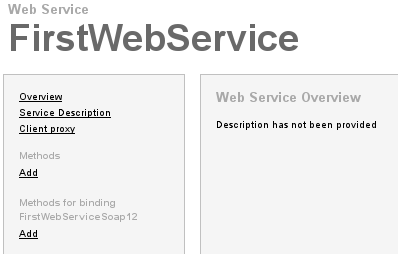
and when you goto the web URL for the webservice you should see something similar to this

The FirstWebService URL

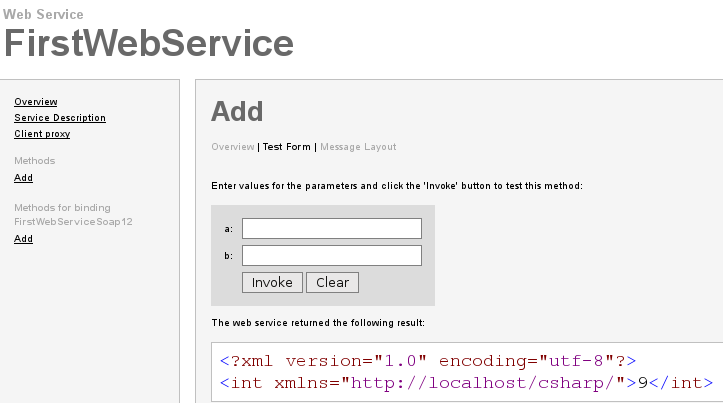
if you click on the left menu “add” and then “test form” to test the webservice, it will bring up a window similar to the below, I have done a full test with adding 4 + 5 = 9

Testing the first web service

Mono – web development on Linux

It is really easy to get some web c# (csharp) (asp.net) development within a Linux setup, since I use kubuntu which is derived from ubuntu. All you need to do is to

this installs the mono module for the apache2

aptitude install libapache2-mod-mono

to enable the module to work within apache2 you have to update the mods-enabled directory and to do this, just use the

a2enmod mod_mono_auto

which stands for apache2 (a2) enable (en) mod (module) and then the module name, you will need to restart apache2 for it to work

/etc/init.d/apache2 restart

that is it., then if you look within the /etc/apache2/mods-enabled you will notice the

mod_mono_auto.conf
mod_mono_auto.load

of course you could symlink them yourself, but it is just easier to use the a2enmod script.

Within the .conf file it tells apache what extensions to “listen” to direct to the module mono instead of either php module or just a static html web page.

To test the setup, just create a directory within your hosting directory this is normally /var/www/ or just place a file in that base directory /var/www it is up to you, but within that file you could create a basic test file like.

<%@ Page Language="C#" %>
<html>
  <head>
    <title>Apache2 Mod mono test page</title>
  </head>
  <body>
        <form id="form1" runat="server">
          <asp:label id="lbl1" runat="server">Apache2 Mod mono test page</asp:label>
        </form>
  </body>
</html>

the asp:label will be the main test, since that part of the csharp library as such. you should see something like

Apache2 Mod mono test page

SOAP – the client with requested and responses

From the SOAP server page here, this is the client that can connect to the PHP server page, the client uses the WSDL (Web Services Description Language) part of the server to find out the functions that are available.

To connect to the server WSDL, you create a new Soap Client with the WSDL as the URI link

  $client = new SoapClient("http://localhost/projects/webservice/zend_soap_server.php?wsdl")

in this example I am passing in some variables for debugging

    array(
      "trace"      => 1,		// enable trace to view what is happening
      "exceptions" => 0,		// disable exceptions
      "cache_wsdl" => 0) 		// disable any caching on the wsdl, encase you alter the wsdl server

so to only get a response from the server you just need to call the function on the server like it is running within the local PHP environment

  echo $client->getQuote("monday");

What is happening behind the scenes, is that the client has created a XML request and send that to the server, the server processes the request and responds with a XML response to the client, the client then pulls out the result from the XML response, here is how with using the soap client trace debugging out

  // display what was sent to the server (the request)
  echo "<p>Request :".htmlspecialchars($client->__getLastRequest()) ."</p>";
  // display the response from the server
  echo "<p>Response:".htmlspecialchars($client->__getLastResponse())."</p>";

here is the full source code, save as zend_soap_client.php (it is not using any zend framework, but the server is)

<?php
  // create a connection to the local host zend soap server, pull back the wsdl to get the functions names
  // and also the parameters and return values
  $client = new SoapClient("http://localhost/projects/webservice/zend_soap_server.php?wsdl",
    array(
      "trace"      => 1,		// enable trace to view what is happening
      "exceptions" => 0,		// disable exceptions
      "cache_wsdl" => 0) 		// disable any caching on the wsdl, encase you alter the wsdl server
  );
 
  // get a response from the WSDL zend server function getQuote for the day monday
  echo $client->getQuote("monday");
 
  // display what was sent to the server (the request)
  echo "<p>Request :".htmlspecialchars($client->__getLastRequest()) ."</p>";
  // display the response from the server
  echo "<p>Response:".htmlspecialchars($client->__getLastResponse())."</p>";
?>

and here is the output on the web page

Monday's child is fair of face
 
Request :<?xml version="1.0" encoding="UTF-8"?> <SOAP-ENV:Envelope xmlns:SOAP-ENV="http://schemas.xmlsoap.org/soap/envelope/" 
xmlns:ns1="http://localhost/projects/webservice/zend_soap_server.php" xmlns:xsd="http://www.w3.org/2001/XMLSchema" 
xmlns:xsi="http://www.w3.org/2001/XMLSchema-instance" xmlns:SOAP-ENC="http://schemas.xmlsoap.org/soap/encoding/" SOAP-ENV:encodingStyle="http://schemas.xmlsoap.org/soap/encoding/">
<SOAP-ENV:Body><ns1:getQuote><quote xsi:type="xsd:string">monday</quote></ns1:getQuote></SOAP-ENV:Body></SOAP-ENV:Envelope>
 
Response:<?xml version="1.0" encoding="UTF-8"?> <SOAP-ENV:Envelope xmlns:SOAP-ENV="http://schemas.xmlsoap.org/soap/envelope/" 
xmlns:ns1="http://localhost/projects/webservice/zend_soap_server.php" xmlns:xsd="http://www.w3.org/2001/XMLSchema" 
xmlns:xsi="http://www.w3.org/2001/XMLSchema-instance" xmlns:SOAP-ENC="http://schemas.xmlsoap.org/soap/encoding/" SOAP-ENV:encodingStyle="http://schemas.xmlsoap.org/soap/encoding/">
<SOAP-ENV:Body><ns1:getQuoteResponse><return xsi:type="xsd:string">Monday's child is fair of face</return></ns1:getQuoteResponse></SOAP-ENV:Body></SOAP-ENV:Envelope>